Last updated: 3 July 2026
Quick answer: On most Range Rovers, place the Salik/Darb tag in the OEM clear patch behind the rear-view mirror; if no clear patch exists, use the upper-left corner of the windscreen (inside, near the frit border), and keep multiple tags at least 10 cm apart.
This guide covers the Range Rover, Range Rover Sport, Velar, Evoque, and the Land Rover Defender with heated or IR-reflective windscreens (windshields). If you drive any of these models in the UAE, you’ve probably experienced the frustration of a toll gate failing to read your Salik or Darb tag. The culprit isn’t a faulty tag—it’s your windscreen.
Most modern Range Rovers feature acoustic lamination, infrared-reflective coatings, or heated glass that can block or weaken the RFID signals toll systems rely on. Here’s how to mount your tags correctly and troubleshoot missed tolls so you never receive a surprise fine.
Why Range Rover Windscreens Block Salik/Darb RFID Reads
RFID toll tags communicate with overhead gantry readers at specific radio frequencies (Salik operates around 915 MHz; Darb uses a similar UHF band). Range Rover windscreens often include:
- Infrared-reflective (IR) coatings – metallic oxide layers that reject solar heat but also attenuate radio waves.
- Heated windscreens – fine tungsten wires or a conductive film embedded in the glass, which acts as a partial Faraday cage.
- Acoustic PVB interlayers – less problematic for RFID on their own, but combined with other coatings they add signal attenuation.
The result? A Salik or Darb tag stuck in the “standard” centre-top position may read intermittently or not at all.
Best Places to Stick Salik and Darb Tags on Range Rovers
1. Locate the RFID-Friendly Window (Black-Dot Zone or Clear Patch)
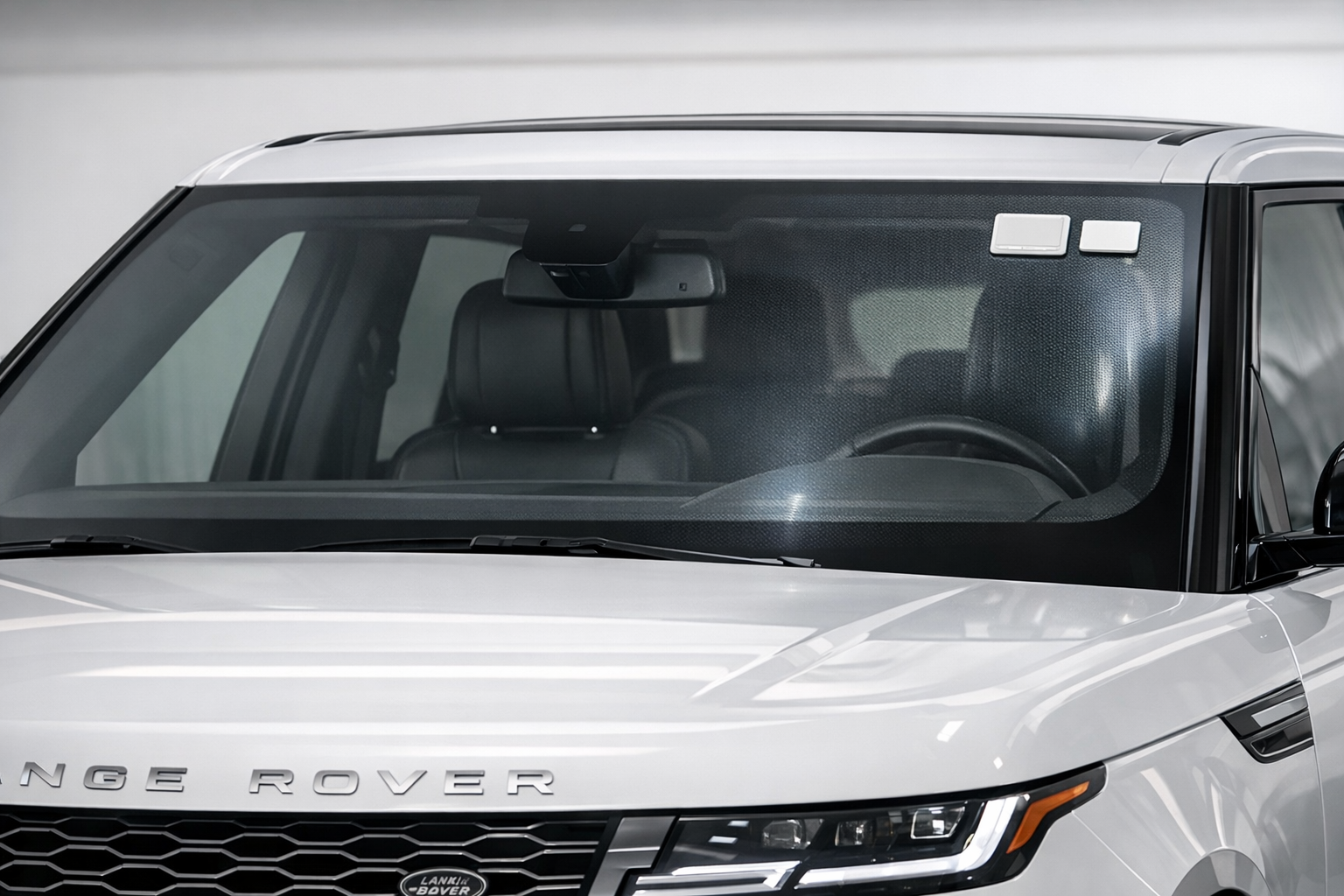
Land Rover designates a small area—typically behind the rear-view mirror or in the upper-left/right corner—where the metallic coating is deliberately omitted. Look for:
- A rectangular clear patch (approximately 10 cm × 12 cm) visible when you view the glass at an angle against light.
- On some models it sits just left of the rain-sensor housing.
This is the single best place to stick a Salik tag on a Range Rover with an IR or heated windscreen.
2. If No Clear Patch Is Visible
Some pre-2020 Range Rover and Defender models lack a dedicated RFID window. In this case, mount the tag on the upper-left corner of the windscreen (passenger side in a left-hand-drive UAE-spec vehicle), as close to the glass edge as possible—coatings are thinnest near the ceramic frit border.
3. Darb Tag Placement for Abu Dhabi Tolls
Darb sticker tags follow the same placement rules. If you carry both Salik and Darb tags on the same Range Rover, place them at least 10 cm apart to avoid signal collision, ideally on opposite upper corners.
Step-by-Step: Mounting Salik/Darb Tags on Heated or IR Windscreens
- Clean the glass – Use isopropyl alcohol on the interior surface to remove oils and dust.
- Test before permanent adhesion – Hold the tag in position and drive through a toll gate to confirm a successful deduction (check the Salik or Darb app immediately).
- Peel and stick – Once verified, remove the adhesive backing and press firmly for 30 seconds.
- Avoid tint strips – Never place the tag behind the tinted sun-band at the top of the windscreen.
- Do not stack tags – Placing one tag on top of another will cause read failures for both.
Troubleshooting Missed Salik/Darb Tolls on Range Rovers
- Intermittent reads – Likely cause: tag placed over a coated area. Fix: relocate to the clear patch.
- No reads at all – Likely cause: heated windscreen blocking the RFID signal entirely. Fix: use an external roof-mount tag holder (available from Salik service centres) or a professional bumper-mount transponder.
- Double charges – Likely cause: two tags positioned too close together. Fix: separate by at least 10 cm.
- Fine received despite having a balance – Likely cause: tag not registered to your plate. Fix: re-register via the Salik or Darb app.
If you continue to experience Salik or Darb read failures after repositioning, an external transponder mount attached to the front bumper grille or headlamp housing bracket can solve the problem permanently. This requires professional fitting to avoid water ingress and ensure correct read angles.
When to Seek Professional Help
Persistent toll issues on a Range Rover can sometimes indicate windscreen delamination, aftermarket tint interfering with the RFID zone, or an incorrectly installed replacement windscreen that lacks the OEM clear patch.
Need a professional fit in Dubai? Book a Range Rover windscreen RFID check and Salik/Darb tag placement at Euro Expert. They work exclusively with European marques and understand the unique glazing specifications across every Range Rover generation—from early Vogue models to the latest Sport and Defender.
👉 Visit Euro Expert – Range Rover windscreen RFID check in Dubai to schedule an inspection.
Final Tips
- Keep your Salik/Darb app notifications turned on so you catch missed tolls within 24 hours.
- After any windscreen replacement on your Range Rover, always re-test your tag before committing to a permanent position.
- Budget for a professional fitting if your model has a full heated screen—DIY repositioning rarely solves the issue on its own.
Drive confidently through every toll gate in Dubai and Abu Dhabi. A few minutes of preparation—and the right expert advice—will save you hours of disputes and unnecessary fines.